


GitHub Actions
Overview
With a GitHub repository there's a very easy way to set up CI that runs when your repository changes: add a .yml file to your repository in the directory
.github/workflows
Each file in this directory represents a workflow and will, when triggered, spin up a virtual machine and run the sequence of commands in the file.
The machines are called runners, and GitHub hosts them for you.
The specifications are documented here and are increased from time to time, so it is worth checking back occasionally rather than memorising them.
A single workflow run can last up to six hours.
Runners are free for public repositories.
For private repositories you have a monthly quota of runner-minutes before any payment is required, which is one reason your repository for this course should be public.
Creating a basic workflow
We will start with a minimal example to demonstrate various features of a GitHub Actions workflow.
Create a file in your repository called:
.github/workflows/basic.yml
Copy the following code, then commit and push the changes to GitHub.
If the push is rejected with a message about the
workflow scope, your git credentials are not allowed to change workflow files.
This happens with some tokens, including ones created by older versions of gh auth login.
Either re-authenticate with that scope, use SSH instead of HTTPS, or create the file in GitHub's web editor, which is not affected.name: Basic GitHub Actions Workflow on: push: pull_request: workflow_dispatch: jobs: basic-job: runs-on: ubuntu-latest steps: - name: Run a one-line script run: echo "Hello, world!"
Here's a brief breakdown of this basic workflow:
- The
namefield gives your workflow a name. This name will be displayed in the Actions tab of your GitHub repository. - The
onfield specifies when your workflow should run. In this case, it's configured to run onpushevents,pull_requestevents, andworkflow_dispatchevents. - The
jobsfield describes the jobs that make up your workflow. This workflow includes a single job calledbasic-job. - The
runs-onfield inside thebasic-jobjob specifies the type of machine to run the job on. Here it is set to run on the latest available version of Ubuntu. - The
stepsfield is a list of tasks to perform in the job. Each item in the list is a separate task. Here, we have one task that runs a basic shell command (echo "Hello, world!"). Thenamefield gives the step a name that will be displayed in the GitHub Actions UI. - The
runfield specifies the command to run. Here, it's just echoing "Hello, world!" to the console.
If you now navigate to the Actions tab on your GitHub repository, you should see that this workflow has run and succeeded.
In this case it was run because we just pushed a change.
We can also trigger this workflow by opening a pull request, or by navigating to the workflow via the Actions tab and then selecting the Run Workflow dropdown (this is the
workflow_dispatch trigger).Creating a Python-specific workflow
Now let's do something more useful: install the project, lint it, and run its tests, on several versions of Python at once.
Go to the Actions tab and click New workflow near the top left.
GitHub offers a set of starter workflows here, and it is worth a moment to see what is on offer.
Do not use the Python one.
At the time of writing it pins Python 3.9 to 3.11, two of which are past end of life, uses old versions of the actions, installs
flake8 and pytest by hand rather than installing your project, and runs the linter twice.
That is a useful lesson in itself: a starter template is a snapshot of what was sensible when somebody wrote it, and nobody is obliged to keep it current for you.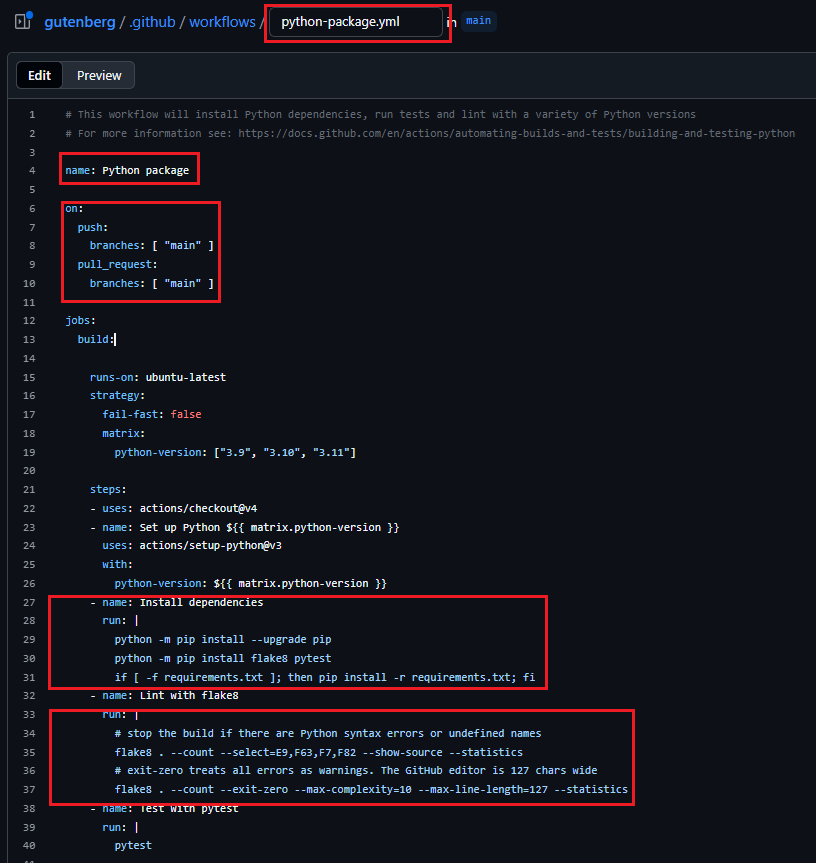
Instead, choose set up a workflow yourself.
This opens GitHub's in-browser editor, which is a convenient way to add a workflow without leaving the site.
Name the file
python_versions.yml and give it this content:name: Python versions on: push: branches: ["main"] pull_request: branches: ["main"] workflow_dispatch: jobs: python-tests: runs-on: ubuntu-latest strategy: fail-fast: false matrix: python-version: ["3.12", "3.13", "3.14"] steps: - uses: actions/checkout@v7 - name: Set up Python ${{ matrix.python-version }} uses: actions/setup-python@v7 with: python-version: ${{ matrix.python-version }} - name: Install dependencies run: | python -m pip install .[dev] - name: Lint with ruff run: | ruff check . - name: Test with pytest run: | pytest
Commit it, then go to the Actions tab and watch it run.
Let's go through what is happening.
This workflow runs whenever there's a push to
main, a pull request targeting main, or a workflow_dispatch trigger.It has one job,
python-tests, which runs on the latest version of Ubuntu.That job uses a matrix, which runs the same job several times with different settings.
Here it runs three times, once for each Python version.
fail-fast: false means that if one version fails the others keep going, which is what you want: you would rather learn that the failure happens on every version than only hear about the first one.Then the steps:
- Check out the code.
actions/checkout@v7is an action, a prewritten piece of work that somebody else maintains.uses:pulls one in, whererun:runs your own command. This one copies your repository onto the runner. - Set up Python.
actions/setup-python@v7installs the version named by the matrix. Note how${{ matrix.python-version }}reads the current value out of the matrix. - Install dependencies.
pip install .[dev]installs your project along with its development dependencies, which are declared inpyproject.toml. Have a look at that file: thedevextra is wherepytestandruffcome from. - Lint with ruff. Ruff is a static analysis tool: it reads your code without running it and reports things that look wrong. Its configuration for this project is also in
pyproject.toml. - Test with pytest. Runs the test suite.
Note the order. The linter runs before the tests, and a failing step stops the job, so if the linter is unhappy you will never see the test results. That will matter in a moment.
Your first failure: the linter
If all has gone to plan, the workflow has failed.
Click into the failed run and open the Lint with ruff step.
Ruff reports three problems, and none of them is a matter of taste.
Fix the lint failures
Read what ruff says, work out why each one is a real problem rather than someone's preference, and fix all three.
You can run the same check locally, which is much quicker than pushing and waiting:
ruff check .
Push your fixes and confirm the step passes.
Your second failure: it works on my machine
Fix the linter, push, and the job gets further and then fails again, this time on Test with pytest.
Five tests fail with
FileNotFoundError.
Before reading on, run pytest on your own machine.
It passes.Work out why CI disagrees with your laptop
Read the error in the CI log carefully, particularly the path it is complaining about.
Work out why the same tests pass locally and fail on the runner, and fix it.
Testing on multiple operating systems
This workflow just varied one thing, the Python version. In principle, it can vary anything.
Workflow on multiple operating systems
Create a second workflow,
os_versions.yml, that fixes the Python version at 3.13 and instead runs across ubuntu-latest, macos-latest and windows-latest.Push it and see what happens.
Ubuntu and macOS pass. Windows fails.
Fix the Windows failure
One test,
test_replaces_an_existing_report, fails only on Windows.
Find out why and fix it so that all three pass.Optional: when the matrix and the project disagree
Add a Python version the project does not support
Look in
pyproject.toml for requires-python.
It declares the oldest version of Python this project claims to work on.Add a version below that floor to the matrix in
python_versions.yml, push, and see what happens.Then decide what the right fix is. There is more than one sensible answer.
Next steps
- [optional] read more about GitHub-hosted runners.
- [optional] read more about the workflow syntax for GitHub Actions.